Online Image Resizer Tool

Welcome to ToolHive’s Free Online Image Resizer – the ultimate solution for all your image sizing needs. Are you struggling with photos that are too large for your website, social media profile, or email? Our intuitive and powerful tool allows you to resize image files in seconds. Supporting popular formats like JPG, PNG, and WebP, you can easily change image dimensions, reduce file size for faster loading, and perfectly format pictures for platforms like Facebook, Instagram, and LinkedIn. Experience a seamless, browser-based editing process with no watermarks and no sign-up required.

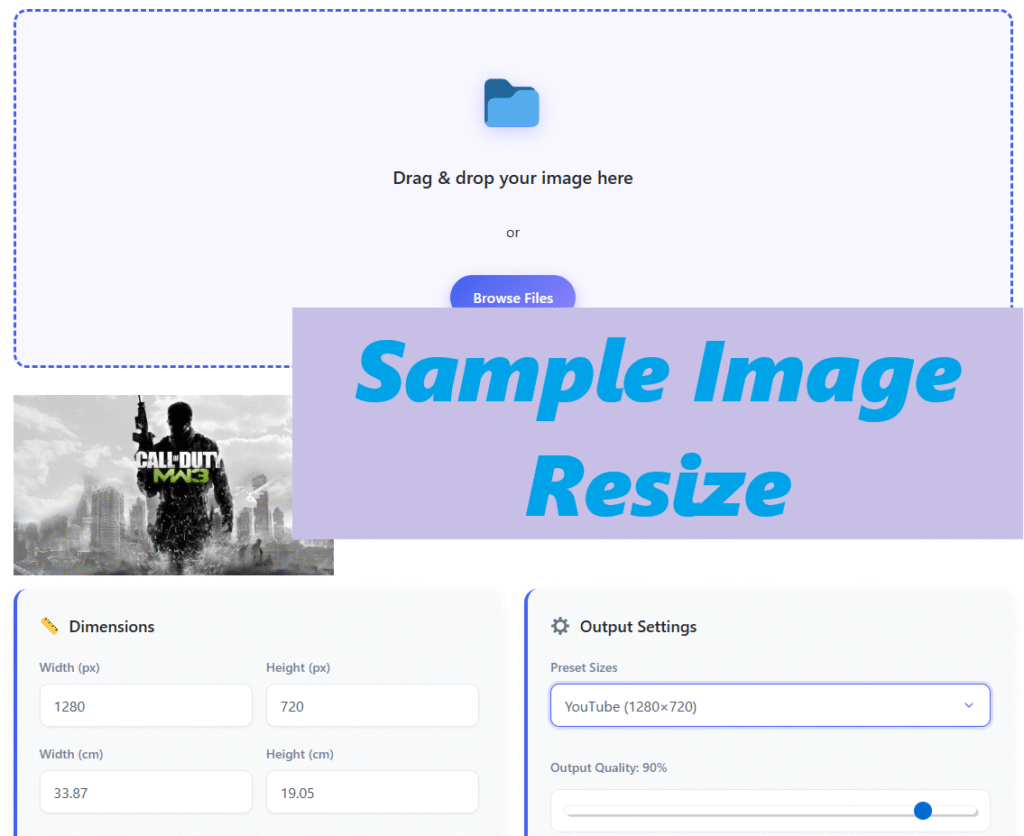
How to Resize an Image in Seconds:

Our tool is designed for simplicity and speed. Follow these three easy steps to get the perfect image size:

  1. Upload Your Image: Click the upload area to select a file from your computer or simply drag and drop it. We support JPG to JPG, PNG to PNG, and WebP to WebP resizing, maintaining your original format.

  2. Choose Your Dimensions: Enter your desired width and height in pixels. You can use our handy presets for social media image sizes or resize by a percentage for proportional scaling.

  3. Download & Use: Hit the “Resize” button and your optimized image will be ready in a flash. Download your perfectly resized picture with a single click!

Image Resize Tool

Processing image...

Upload, resize, and download your images in seconds

📁

Drag & drop your image here

or

Browse Files
Image preview
📏 Dimensions
⚙️ Output Settings
🔧 Advanced Editing Options
✂️ Crop Tool ADVANCED
🎛️ Image Adjustments ADVANCED
Image Resizer - Fast & Easy | ToolHive

Image Resizer

Resize images instantly in your browser. No uploads, no watermarks, completely free.

🖼️

Easy Upload

Drag & drop or browse to upload any image

📐

Custom Sizes

Set exact dimensions or use presets

Instant Processing

See results immediately in your browser

🔒

100% Private

Your images never leave your device

📱

Mobile Friendly

Works perfectly on all devices

💾

Easy Download

Save your resized image with one click

How It Works

1

Upload Image

Select your image file

2

Set Size

Choose dimensions or preset

3

Preview

See the result instantly

4

Download

Save your resized image

🔒 All processing happens locally in your browser - your images are never uploaded to any server

Why Use Our Free Image Size Converter?

In today’s digital world, image optimization is not a luxury—it’s a necessity. A free image resizer like ToolHive’s empowers everyone, from bloggers and small business owners to social media managers and e-commerce store operators.

  • Boost Website Speed: Large images slow down your website, hurting user experience and SEO rankings. Our tool helps you reduce image size without sacrificing noticeable quality.

  • Perfect for Social Media: Each platform has strict image dimension requirements. Avoid cropped or pixelated photos by resizing for Facebook cover photos, Instagram posts, Twitter headers, and more.

  • Save Storage Space: Optimize your device’s storage by downsizing large photo collections before backing them up or sharing them via email.

  • 100% Secure & Private: Your images are processed directly in your browser. They are never stored on our servers, ensuring your privacy and security.

Frequently Asked Questions About Resizing Images

Can I resize an image without losing quality?

While some quality loss is inherent when downscaling from a very high resolution, our tool uses advanced algorithms to ensure the best possible image quality after resizing. For the best results, start with the highest quality image you have.

Our online image resizer supports all major formats, including JPG, PNG, and WebP. You can resize a JPG image for your blog or convert a PNG with a transparent background for a logo.

No! ToolHive’s free image resizer is completely free to use with no daily limits. You can resize as many pictures as you need.

Unlike complex photo editing software, our tool focuses on doing one job perfectly: resizing and optimizing images. It’s faster, simpler, and requires no technical skills or software installation.

Absolutely! While you can input custom dimensions, we recommend using standard sizes. For example, an Instagram post is best at 1080×1080 pixels (square) or 1080×1350 pixels (portrait).

Resize Your Images Now and Boost Your Online Presence

Don’t let improperly sized images hold you back. A fast-loading website with perfectly formatted visuals is key to engaging your audience and improving your search engine visibility.

Ready to optimize? The ToolHive Online Image Resizer is right above this section. It’s your go-to free image editing tool for a quick, efficient, and professional result.

Explore More Tools: After you’ve finished resizing, check out other free utilities in the ToolHive suite to streamline your digital workflow!

Online Image Resizer
Scroll to Top